

Auto · AI × Lang × OS
From instant scripts to interfaces, desktops, and applications.
中文 · Language guide · v0.5 notes · Website sources
Auto is a language and application ecosystem built around AutoLang. Run scripts immediately on AutoVM and build programs through Rust transpilation. AutoUI brings shared interface definitions to the web and native desktop; AutoOS organizes the desktop and system applications; AutoAI supplies shared model services and Agent tools.
AutoEdit, AutoShell, AutoMusk, and AutoJade put these foundations to work in editing, command automation, AI-assisted development, and knowledge management. This repository is the ecosystem’s entry point and maintains the language implementation, UI framework, and developer toolchain.
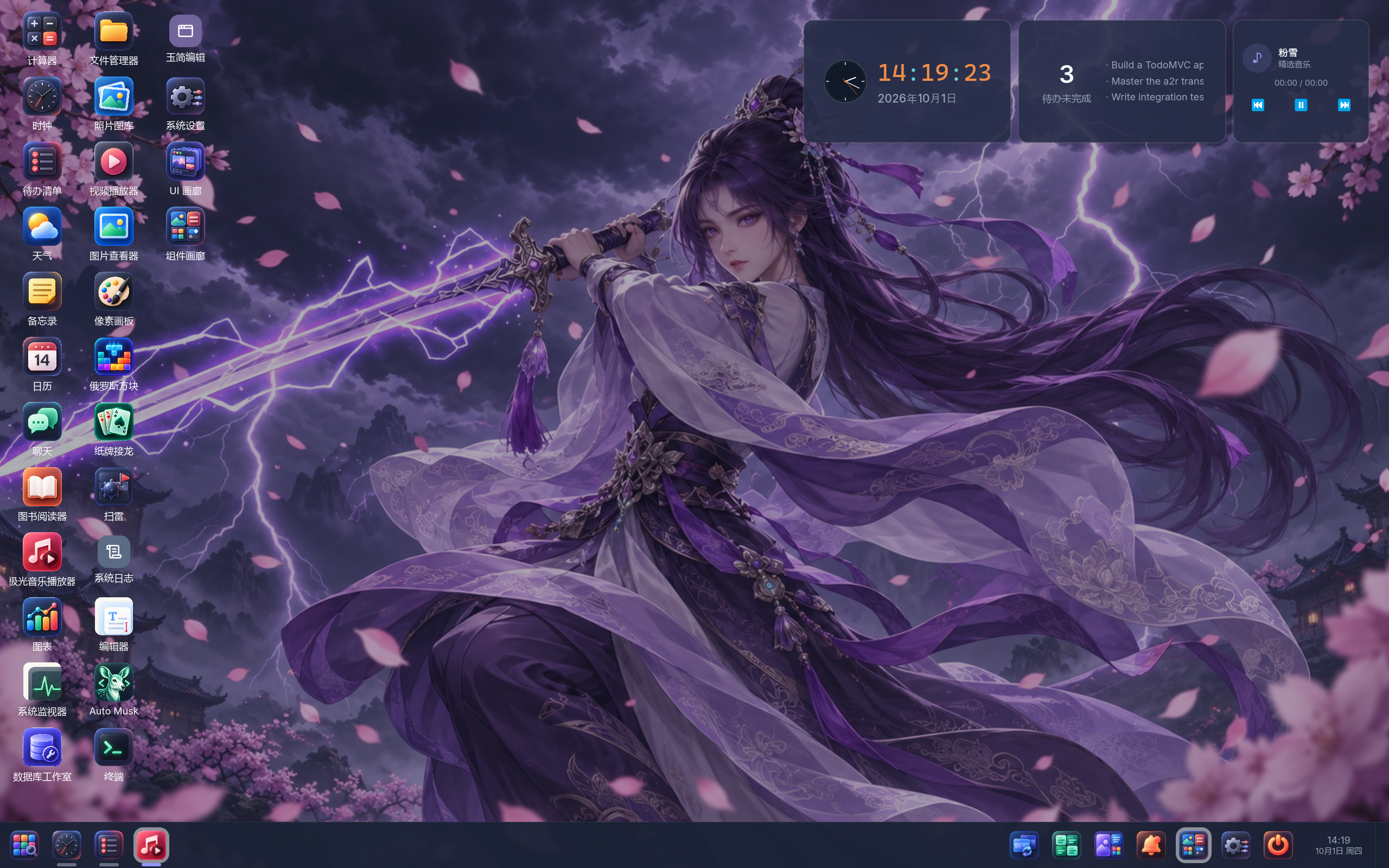
AutoOS native desktop, captured on 2026-10-01. The widgets belong to apps that have been started and minimized. This original image is shared with the website; click to view it at full size.
The ecosystem
| Project | Role | Explore |
|---|---|---|
| AutoLang | A dynamic-meets-static language: AutoVM for scripting, Rust for the main static shipping path, and bridges to Rust, Python, and C | Language overview · Compiler and runtime |
| AutoUI | State, events, and views in Auto; Vue for web interfaces and Rust/iced for native desktop, with hot reload, DevTools, and MCP inspection | UI introduction · Examples |
| AutoOS | A hosted desktop with windows, workspaces, Launcher, settings, and system applications | Desktop introduction · Source |
| AutoAI | Shared model clients and the aaid service, plus Agent roles, skills, and tools used by applications |
AI introduction · Source |
The working idea is script now, ship as Rust: keep the iteration loop short, then use the Rust ecosystem for native builds. AutoUI extends that workflow to interfaces; AutoOS gives applications a shared desktop; AutoAI connects applications to model services and Agent workflows.
AutoOS currently runs within a host operating system. Language as OS (LaOS) is the implementation direction, and OS over OS describes that current hosted form. Independently deployable systems and deeper AI-assisted knowledge work remain longer-term directions. See the OS introduction.
Applications
| Application | What it is for | Learn more / source |
|---|---|---|
| AutoEdit | Browse projects, edit code and text, search files, and compare files, directories, or editing buffers | Introduction · auto-edit |
| AutoShell | An interactive command session, structured file/JSON pipelines, and multiline AutoScript; CLI and GUI forms | Introduction · Usage guide · auto-shell |
| AutoMusk | A coding-agent workspace connecting project conversations, tools, Plans, Specs, execution, and review | Introduction · auto-musk |
| AutoJade | AutoDown documents and local knowledge bases: editing, page links, backlinks, search, and organization | Introduction · auto-jade |
AutoDown supplies the document format and editing foundations. AutoDown and Jade Garden introduces the related document and knowledge workspace; auto-down is its source repository.
System applications and demos include file management, a terminal, settings, system monitoring, notes, calendars, charts, media tools, and games. Browse the application catalog and UI example projects. These applications combine Auto and Rust foundations; their features and readiness are described individually.
AutoEdit: code and text
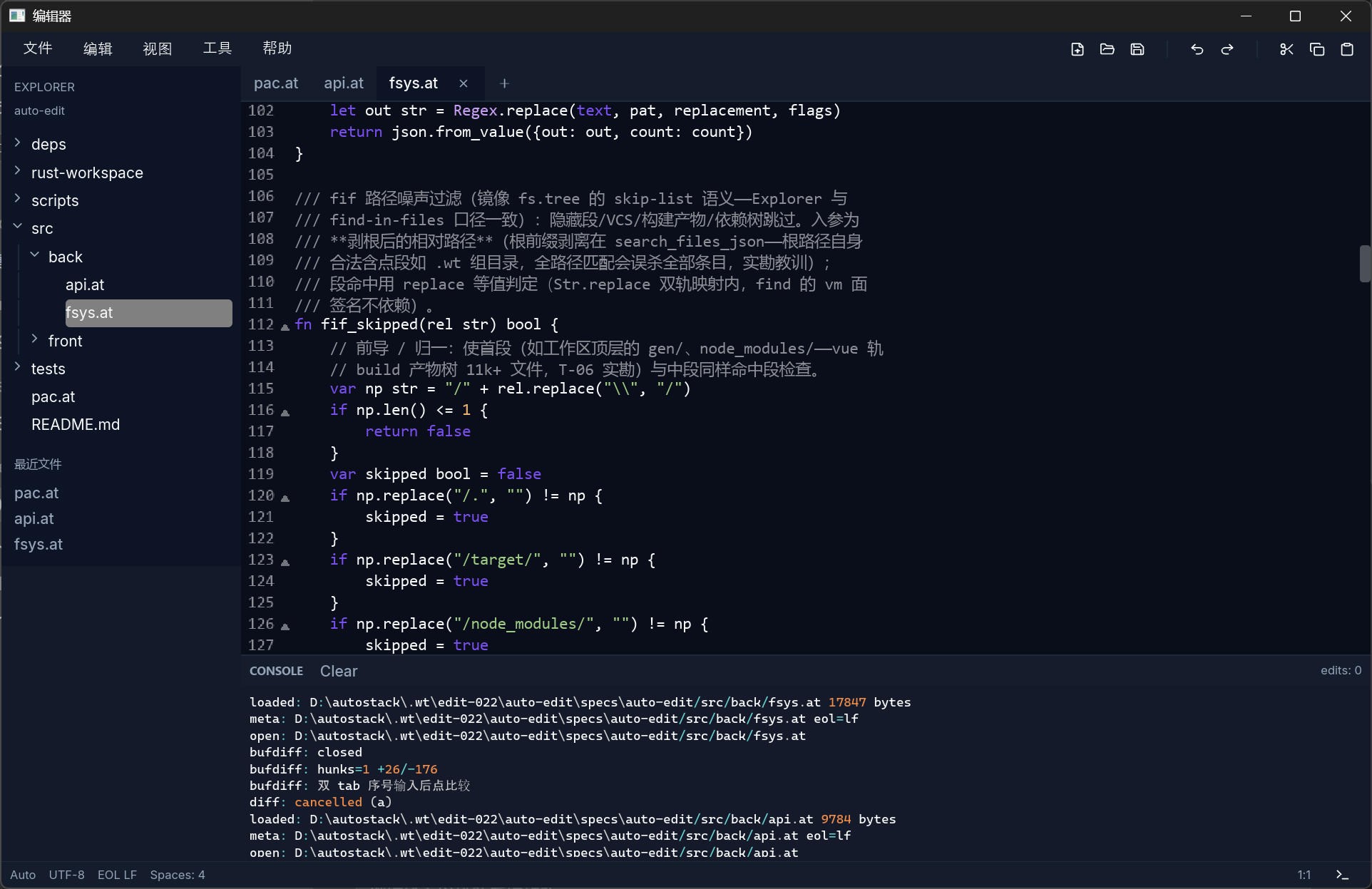
Native AutoEdit workspace. User-provided capture from 2026-10-01, shared with the website.
AutoShell: commands and structured data
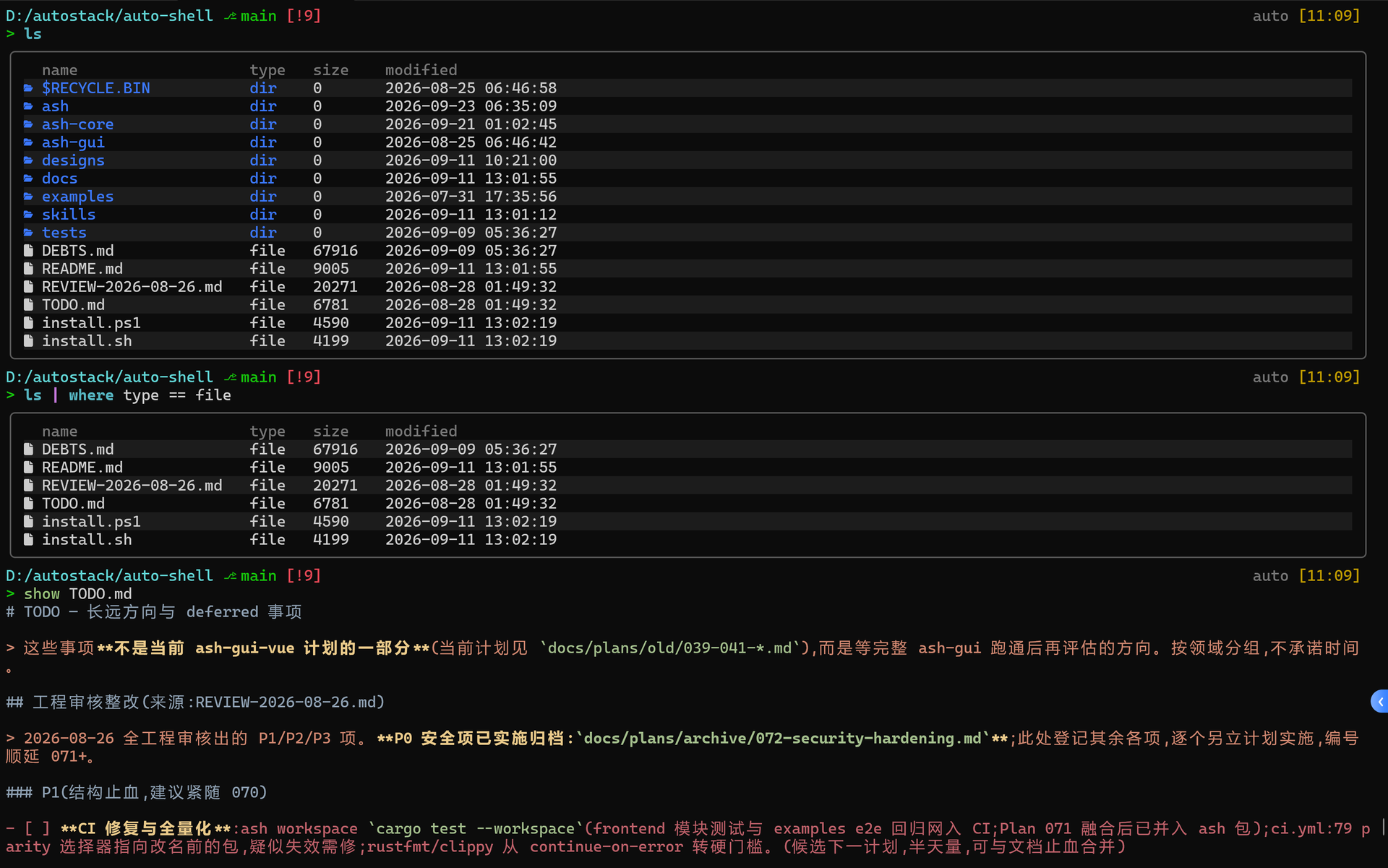
Original ash terminal capture used by the website’s AutoShell preview and guide, from the
September 2026 capture set. The full session shows both structured output and AutoScript.
The v0.5 milestone
v0.5 brings the language, interfaces, desktop, and applications together:
- Language and services: module loading, Actor state and scheduling, lazy generators, streaming IO, and HTTP APIs, alongside the main Rust transpilation path.
- Ecosystem bridges: Rust natives and
dep/use.rsshims; CPython throughuse.py;.asscripting and Python transpilation, with real-library and PyTorch parity cases. - Interfaces and desktop: Vue and iced, themes, editors, charts and media integrations; hosted desktop windows, Launcher, settings, and system apps.
- Developer tools: LSP, browser Playground, debugging, F12 DevTools, MCP tree/layout/screenshot inspection, and shared build caches.
- Experimental self-hosting: Auto-written VM and transpiler implementations close a verified Auto → Rust → Rust compiler loop. The Rust implementation remains the reference toolchain.
The release notes describe a rolling milestone, with the audited history through 2026-09-30; release-candidate freezing is tracked separately. Backend coverage and application maturity vary. Web and native desktop are the main UI paths; Android/HarmonyOS are feasibility/demo paths, and broader mobile, MCU, and independent-OS support remain roadmap work.
Start with a script
With an auto CLI available, run the existing Hello World example:
sh
auto docs/tour/ch01-hello/01_hello.at
auto
fn main() {
    print("Hello, World!")
}
To inspect generated Rust from the same source:
sh
auto trans --path docs/tour/ch01-hello/01_hello.at rust
For an interface, the existing counter project has both web and native development paths:
sh
auto run examples/ui/002-counter -r vue
auto run examples/ui/002-counter -r vm
Vue development also needs the project’s Node.js/package-manager dependencies. Native UI uses iced; media examples have additional runtime requirements. See the counter guide.
Building from source: this workspace currently has a sibling auto-down path dependency.
Clone auto-lang and auto-down
as adjacent directories, then build cargo build -p auto --release from auto-lang.
The default CLI includes Python and AutoDown integration: prepare the matching CPython development
and native build environment. The binary is target/release/auto (auto.exe on Windows).
See the language guide for the feature choices.
Learn and explore
| Goal | Start here |
|---|---|
| Learn the current language | Language overview · Hands-on Tour |
| Develop a script and ship it | From Script to Ship · Parity examples |
| Build an interface | AutoUI · UI projects · Blueprints |
| Explore the desktop and apps | AutoOS · Application catalog |
| Understand shared AI services | AutoAI · AutoMusk |
| Explore browser examples | Playground page · Run the website locally |
| Read the books | Auto and companion books |
Website links here point to the authored pages in this repository. The website builds those introductions and the shared screenshots into a bilingual documentation site.
Repository and contributions
crates/: language, AutoVM, transpilers, UI, CLI, LSP, package/build tools, and Playground.stdlib/,docs/schema/,packages/,packages/blueprints/: standard libraries, UI contracts, components, and reusable UI blueprints.examples/andtest/parity/: runnable projects and behavior comparisons.docs/andwebsite/: learning material, design knowledge, release notes, and site sources.packages/aavm/: experimental self-hosted toolchain.
For development, follow AGENTS.md and the Plan/Spec workflow. Work in an isolated worktree and use the checks appropriate to the change.